
Signing up for 1PPP Game takes barely a minute, but rush through it and you’ll pay for it later — a mistyped phone number, a referral code you forgot to enter, or a password you can’t remember by the weekend. Get it right the first time and your welcome bonus lands correctly, your account is tied to the number you actually use every day, and you skip the annoying back-and-forth with support that a sloppy signup usually causes. Below is the full walkthrough for both Android and browser, plus the referral code details and fixes for the handful of registration hiccups people run into most.
A surprising number of support requests on gaming platforms trace back not to bugs or bad luck, but to a rushed registration — a digit off in the phone number, a referral code typed in after the fact and quietly ignored, or a password nobody wrote down anywhere. None of these are hard to avoid once you know what to watch for, which is exactly what the rest of this guide sets out to cover in detail.
What Is a 1PPP Game?
1PPP Game is a real-money online gaming platform built for players in Pakistan, offering slots, card games, live casino tables, crash-style games and sports betting from a single account. JazzCash, EasyPaisa and bank transfer handle deposits and withdrawals, and the platform is reachable both through its Android APK and through the browser at 1pppgame.net.pk for players on PC or iPhone.
Before You Register — What You’ll Need
An Active Pakistani Mobile Number
Registration is built entirely around your mobile number, since that’s where your one-time verification code (OTP) gets sent. Your SIM needs to be active and able to receive SMS at the moment you register — a number that’s out of balance, in a dead zone, or temporarily suspended will hold up the whole process.
No CNIC, Email or Document Uploads Required
Signing up doesn’t ask for your CNIC, an email address, or any document upload — just a mobile number and a password. This keeps the process quick, though it’s worth knowing upfront that ID verification can still come into play later, specifically around larger withdrawals, which this guide covers further down.
Age Requirement
Real-money gaming platforms in Pakistan, 1PPP Game included, require players to be adults. Registering an account is an implicit confirmation that you meet the platform’s minimum age requirement, and this isn’t something to work around.
Beyond the mobile number, password and age requirement, it also helps to have a rough idea of your first deposit method sorted before you register, even though it isn’t needed for signup itself. Knowing whether you’ll fund the account through JazzCash, EasyPaisa or a bank transfer means you can move straight from registration into your first deposit without a pause to figure out payment details.
How to Register on Android
- Download the 1PPP Game APK from the official website and install it, enabling ‘Install from Unknown Sources’ if prompted.
- Open the app and tap Register or Sign Up on the welcome screen.
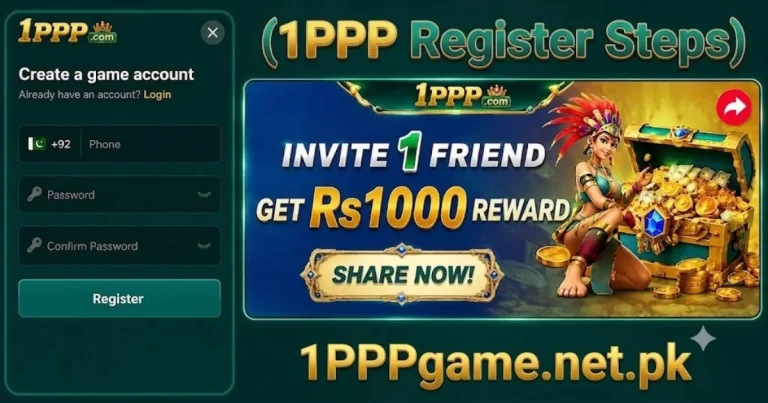
- Enter your Pakistani mobile number in the +92 format.
- Create a password and confirm it.
- Enter the OTP sent to your number via SMS.
- Accept the terms and conditions, then tap Complete Registration.
How to Register via Browser (1pppgame.net.pk) on PC/iPhone
- Open any browser on your PC or iPhone and go to 1pppgame.net.pk
- Tap or click Register in the top corner of the homepage.
- Enter your mobile number, create your password, and submit the form.
- Verify with the OTP sent to your phone via SMS.
- Accept the terms and conditions to finish creating your account.
The browser signup is basically the same flow as the app, so if you’ve done one, the other feels familiar right away. Your account and balance stay synced no matter which one you log in from afterward.
iPhone users usually end up on the browser route by default, since 1PPP Game isn’t listed on the Apple App Store any more than it’s on Google Play. Bookmark 1pppgame.net.pk after your first visit so you’re not hunting for the site again every time you want to log in or check your balance.
Step-by-Step: Filling Out the Registration Form
Entering Your Mobile Number (+92 Format)
The number field usually comes pre-filled with the +92 country code, so just type in the remaining digits and drop the leading zero you’d normally use locally. Double-check this before hitting submit — get a digit wrong and the OTP heads to a stranger’s phone instead of yours.
Creating a Strong Password (Length and Character Rules)
Passwords generally need to hit a minimum length, usually eight characters, with a mix of letters and numbers. Skip the obvious stuff — your name, your birthday, ‘12345678’ — and don’t recycle a password from another account, since a breach somewhere else shouldn’t be able to touch your gaming balance too.
Confirming With OTP Verification
Once you submit the form, an OTP arrives via SMS within a few seconds in most cases. Enter it exactly as received before it expires — most OTPs are time-limited to a few minutes for security reasons.
Accepting Terms and Conditions
The final step is checking the box confirming you’ve read and accept the platform’s terms and conditions. It’s worth actually skimming these at least once, particularly the sections on withdrawal rules and bonus wagering requirements, since they matter more once you start playing than most players expect.
Using a Referral Code During Registration
Where to Find a Valid Code
Referral codes come from existing 1PPP Game players — a friend’s shared link, a code posted in a gaming WhatsApp group, or an agent’s promotional material. Any code from a currently active player’s account should work, though codes tied to expired promotions occasionally stop functioning.
How It Affects Your Welcome Bonus
Signing up with a valid referral code usually gets you a better welcome bonus than skipping it, since the platform rewards both you and whoever referred you for the new signup. Worth checking the exact bonus terms in the Bonus section once you’re in.
The size of this enhanced bonus, and whether it comes as extra bonus funds, free spins, or a boosted deposit match, varies depending on whatever referral promotion is currently active. It’s worth asking whoever gave you the code what specific bonus they received when they signed up, since referral terms do get updated periodically and their experience is a reasonable, if not perfectly reliable, guide to what to expect.
Why It Can Only Be Entered During Signup, Not After
The referral code box only shows up during registration — there’s no way to add one to an account after it already exists. If you’re planning to use a friend’s code, grab it before you start filling out the form, not partway through. Reregistering under a different number just to sneak a code in isn’t worth the hassle.
What Happens After You Register — Claiming Your Welcome Bonus
Once registration completes, your account lands on the home screen with your welcome bonus (if applicable) usually visible in the Bonus or Promotions tab. Some welcome bonuses activate automatically, while others require a small first deposit to unlock — checking the specific terms in-app avoids any surprise about what triggers the credit.
It’s also worth reading through any wagering requirements attached to the welcome bonus before you start playing with it. A bonus that needs to be wagered a certain number of times before becoming withdrawable behaves differently from straightforward cash credit, and knowing that upfront avoids the confusion of trying to withdraw bonus funds that technically haven’t cleared yet.
How Long Registration Actually Takes
For most players, registering on 1PPP Game takes under two minutes from opening the app to landing on the home screen, assuming the OTP arrives promptly and you have your details ready. It’s genuinely one of the faster onboarding flows across Pakistani gaming apps, largely because it skips document uploads entirely.
One Account Per Person — Why Multiple Accounts Cause Problems
Creating more than one account under different numbers to claim multiple welcome bonuses or referral rewards violates most platforms’ terms, 1PPP Game included, and typically results in forfeited bonuses or account restrictions once detected. Backend systems are generally built to flag duplicate-account patterns, so it’s not a reliable way to multiply bonuses even in the short term — stick to one account tied to your real, active number.
There’s also a more practical reason to avoid multiple accounts beyond the terms violation itself: splitting your activity across several accounts means splitting your VIP progress, referral history and transaction records too, which makes tracking your own play and winnings noticeably harder. A single, properly registered account keeps everything — deposits, bonuses, referral earnings and VIP status — consolidated in one place where you can actually keep an eye on it.
Common Registration Problems and Fixes
OTP Not Arriving
First, check if your SIM actually has a signal and isn’t quietly blocking texts from short codes or unfamiliar senders. Waiting a minute and tapping resend usually fixes a slow OTP; if it’s still not showing up after a couple of tries, restarting your phone or switching networks often clears it up.
“Number Already Registered” Errors
That message usually means an account already exists on that number — maybe one you made a while back and forgot about, or in some cases a family member who signed up on a shared phone. Use Forgot Password on the login screen to get back into that account instead of trying to force a brand-new registration on the same number.
Weak Signal or SMS Delays
Weak mobile coverage can hold up OTP delivery well past the usual few seconds. Moving somewhere with better signal, or switching to Wi-Fi calling if your carrier supports SMS over Wi-Fi, usually speeds things back up.
Invalid or Expired Referral Code
Referral codes tied to a since-deactivated account or an ended promotion will be rejected. Double-check the code for typos first, and if it still doesn’t work, register without it — you can still enjoy the standard welcome bonus, just without the referral-specific enhancement.
Registration Button Not Responding
This is often a connectivity issue rather than an account problem — check your internet connection, force-close and reopen the app, or try the browser version at 1pppgame.net.pk instead if the app itself seems stuck.
Registration Safety Tips
- Use your own active SIM for registration rather than someone else’s number, since account recovery later depends on you controlling that number.
- Choose a strong, unique password you haven’t used on any other account.
- Make sure you’re actually on the official 1PPP site or app before typing in any personal details — bookmark the confirmed official domain rather than trusting whatever pops up in a search.
- Don’t share your password or OTP with anyone, ever — including someone claiming to be from 1PPP support or acting as an agent.
Is ID Verification (CNIC) Required to Register?
No — registration itself only needs a mobile number and password, with no CNIC or document upload requested at signup. This makes onboarding fast, but it isn’t the whole picture for the lifetime of your account.
When Documents May Be Requested Later
CNIC verification typically gets requested once you attempt a larger withdrawal, as a standard measure most Pakistani gaming platforms use to confirm the account holder’s identity before releasing bigger sums. This is normal practice, not a sign anything’s wrong — having your CNIC ready before you request a large withdrawal avoids an unexpected delay at that stage.
What to Do Next — Logging In and Making Your First Deposit
With your account created, log in using your registered mobile number and password, then head to the Wallet section to make your first deposit via JazzCash, EasyPaisa or bank transfer. Checking the Bonus tab before depositing is worth doing, since some welcome offers apply automatically on your first deposit rather than at registration itself.
Conclusion
Registering on 1PPP Game is deliberately quick — a mobile number, a password, and an OTP is genuinely all it takes, whether you’re using the Android app or the browser at 1pppgame.net.pk. Taking an extra thirty seconds to double-check your number, pick a real password, and have a referral code ready if you want one saves you from the handful of avoidable problems covered in this guide. Once you’re registered, logging in and making your first deposit is the natural next step toward actually using the platform.